
Explore Public Facebook and Instagram Profiles
How It Works
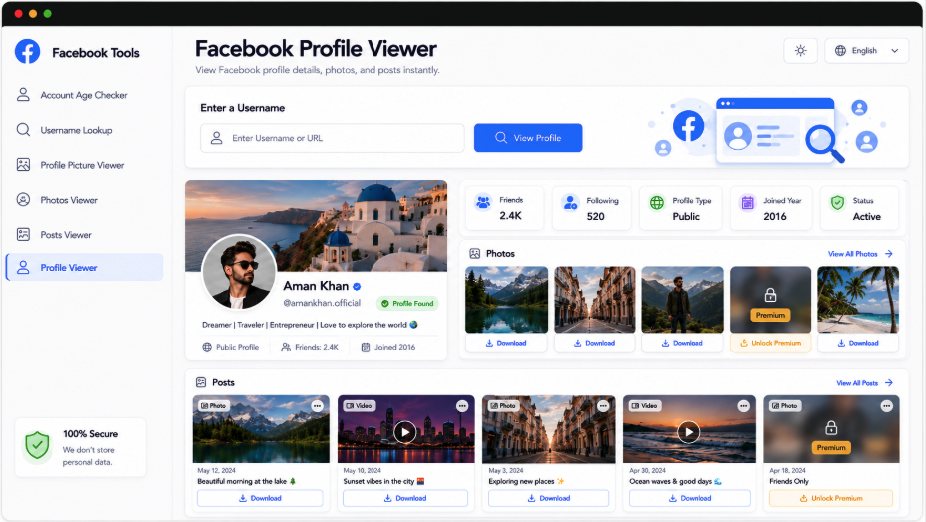
Begin a Facebook lookup with an account handle or profile address to review its accessible information. An identity card brings together the avatar, cover, name, username, intro, links, and other available details. Recent public posts, pictures, reels, and supported media follow, with individual previews and download controls where accessible files are provided.
Bring a Facebook Account into One Clear View
A profile’s identity and its recent activity belong together. AccountPeek presents the available account summary first, then groups supported posts, photos, and media previews into dedicated areas. Confirm the name, images, handle, and intro before opening individual content or choosing an available download.
An Account Summary with Public Details
Recent Feed Content and Short Videos
Avatar and Banner in Context
Inspect Media and Save Supported Files
Understand the Account
Identity Details and Profile Imagery
Examine Recent Activity
Feed Posts, Pictures, and Reels
Select a Media Item
Open Its Preview or Download
Choose a More Focused Facebook View
If a full profile result is more than you need, use a viewer dedicated to the avatar, banner, posts, photos, or reels. These AccountPeek tools keep the lookup process straightforward while narrowing the results to the public content most relevant to your task.
Enlarge a Facebook Display Photo
Inspect available larger avatar versions and save the supported public image file you choose.
Inspect Display PictureSee the Complete Facebook Cover
Open the retrieved banner beyond the normal profile-page crop and download an accessible version.
Explore the CoverFollow Public Facebook Posts
Review detected captions, publishing details, photos, and videos together with previews and supported saves.
Read the Post FeedExplore a Facebook Photo Collection
Browse supported image results, open individual previews, and download accessible photographs.
See Available PhotosOpen a Facebook Reel Feed
Identify the account and view its available short videos with previews, posting details, and saving controls.
Browse Short ClipsEstimate a Facebook Account’s History
Check the supported creation-year timeline, completed account age, and approximate number of elapsed days.
Check Account TimelineCheck Whose Activity You Are Reviewing
A successful search starts with the account identity so you can associate the returned activity with the right person or profile. Accessible details may include the current avatar, banner, name, handle, intro, public URL, joining or timeline information, visible friend information, and other supported fields. What appears depends on the account’s public data.
Photo and video content detected by the lookup
Expanded previews of supported account media
A connected process for media research
Premium Access for Broader Profile Research
Additional Public Account Searches
100%
A Wider Range of Accessible Media
90%
Quicker Review of Account Content
80%
Inside the Facebook Account Overview
The viewer gathers public profile context and accessible activity into a single results page. A handle or URL search identifies the account and returns its available name, imagery, intro, links, and supporting details. Recent posts, photos, reels, and other supported content are organized below, with individual viewing and download options where the source permits them.
Public Identity at a Glance
Read the account’s available name, handle, intro, profile links, and imagery before exploring its activity.
Grouped Content for Easier Review
Recent accessible posts, pictures, reels, and other media are arranged within the same account result.
Open Media One Item at a Time
Eligible photographs, short videos, and supported attachments can be selected for a closer view.
Save Files Returned by Supported Sources
Download controls accompany accessible public media when a usable file is provided for the selected account.
Building the Public Profile Results
The supplied Facebook username or public address identifies the account to retrieve. Available identity information forms the profile card, followed by supported recent posts, photos, reels, and previews. You can explore these sections, open eligible items, and use any supplied saving controls. The results are limited to information that is publicly accessible.
Locate the Facebook User: Enter the account handle or public profile address to start your search.
Verify the Identity Card: Check the returned account details before treating the content as belonging to your intended profile.
Explore Its Public Activity: Review detected posts and media, opening previews or saving supported files as needed.
Frequently Asked Questions
Enter the username or public profile URL, run the search, and verify the identity card. The results then show the available public details and supported activity returned for that account. Browse the sections, select eligible media for a closer view, and use download controls only where they are provided.
No. It displays public information the selected profile makes accessible, such as identity details, images, links, and available posts or reels. Private posts, hidden sections, restricted photos, and other nonpublic material are not unlocked. The collection can change with the account's settings and Facebook's availability during the search.
It generally lets you inspect public account information without interacting directly with the Facebook profile. That is not a guarantee of complete anonymity: websites and service providers can keep technical logs or analytics. The tool organizes public results and does not bypass privacy controls or expose restricted information.