
Inspect a Facebook Account’s Profile Picture
How It Works
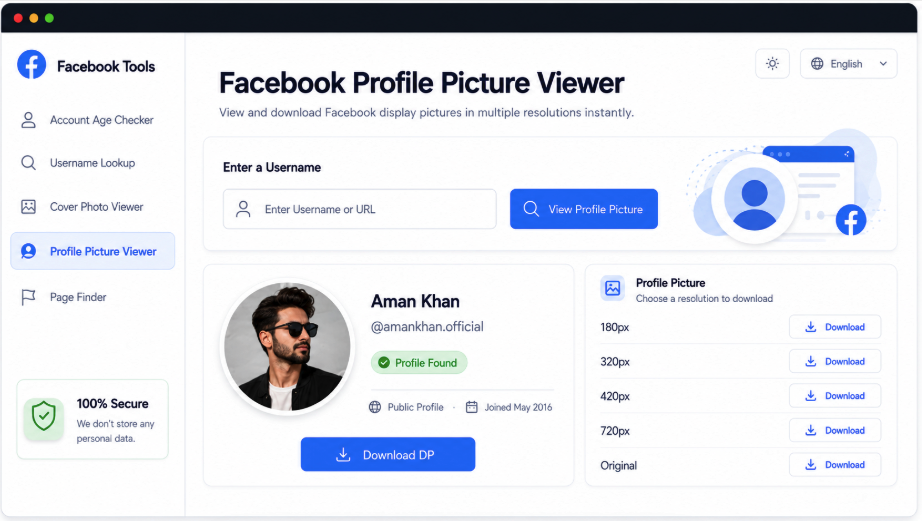
Find the available display picture and cover image associated with a Facebook handle or profile URL. The identity card includes the name, username, intro, profile link, and available imagery. Open the DP in a larger view, compare the source resolutions returned, and save the version that suits your needs when supported.
Match the Picture to Its Facebook Account
Profile images are easier to verify alongside their account details. AccountPeek puts the available DP and cover with the name, handle, intro, and profile address, then provides dedicated image cards below. Confirm the match before opening a larger picture or choosing a file to save.
An Enlarged Facebook DP View
Compare Available Avatar Resolutions
See the Account’s Cover Alongside It
Download Images with Separate Controls
Verify the Picture’s Source
Name, Avatar, and Introductory Details
Compare DP Versions
Available Sizes of the Same Image
Inspect the Image File
Open a Preview and Save
Go Beyond the Facebook Display Picture
AccountPeek’s related viewers cover the full public profile, banner, posts, photo collections, reels, and account timeline. Each accepts a username or profile URL but provides a different research focus, allowing you to follow an avatar check with the account information or media you need next.
View the Account and Its Public Activity
Explore the available intro, identity details, profile images, posts, photos, and reels within a consolidated result.
Inspect Account ActivityInspect the Profile’s Full Banner
Check the cover’s source account, open its wide preview, and save an accessible version at the available quality.
Examine Cover PhotoRead Public Posts from the Account
Follow the available post feed with captions, dates, photos, video previews, and supported media download options.
Open Public Post FeedReview the Account’s Image Gallery
Enlarge detected photos, browse supported collections, and save accessible pictures one at a time.
Browse Account ImagesFind Short Videos on Facebook
Review the account before opening its detected reels, with available posting information, original links, previews, and saving controls.
See Profile ReelsEstablish the Identity Behind the Images
The matching account appears before its larger image views. Depending on public availability, this can include the current DP, cover, full name, handle, intro or headline, URL, and status. Together, these details help confirm that the pictures belong to the Facebook user you intended to search.
Highest Available DP Version
Enlarge the Display Photo
Inspect the Picture Before Downloading
Premium Options for Facebook Avatar Lookups
Additional Facebook DP Searches
100%
Access to Different Image Resolutions
98%
Quicker Account-Image Research
95%
Capabilities of the Facebook DP Viewer
This tool puts profile identification and image inspection in one place. Searching by handle or address returns available account details with its display picture and cover, then lets you examine supported larger versions of the DP. Where several resolutions are detected, compare their quality before saving a preferred public image rather than opening multiple profile sections.
A Clearer View of the Display Photo
Available larger previews make the Facebook avatar easier to inspect than the compact profile thumbnail.
Choose Among Detected Sizes
Compare the source image versions offered and select the resolution appropriate for your needs.
Confirm the Account Using Its Details
The name, handle, intro, profile link, and visible imagery help establish whose picture has been retrieved.
Include the Profile’s Banner
The accessible cover image appears with the DP, adding context to the account’s visual identity.
How the Display-Picture Search Operates
A Facebook handle or URL is matched to its publicly accessible account. AccountPeek prepares an identity card containing the available name, intro, link, avatar, and banner, then offers supported image previews. You can compare returned resolutions and save an accessible version while retaining the profile context used to verify the match.
Search for the Account: Submit the Facebook username or profile link to locate its public imagery.
Verify the Returned Identity: Review the name, handle, intro, and pictures before choosing an image.
Choose a DP Version: Compare supported sizes in the preview and save the available file you prefer.
Frequently Asked Questions
Search with the username or public account address and check the identity card returned. Available name, intro, avatar, cover, and profile-link details help verify the match. Open the DP preview, compare any detected sizes, and use the supported saving option for your preferred version.
No. Larger versions appear only when suitable public image files can be retrieved. The original upload, Facebook's delivery format, account access, and source availability determine the maximum size. The tool can offer detected resolutions, but it cannot create an original high-resolution file that the platform does not supply.
First verify the handle or profile URL, particularly if the account has been renamed. An unavailable account, removed image, privacy restriction, connection problem, or platform change can prevent retrieval. Try the correct input again; if no picture is returned, sufficient public image data may not currently be accessible.