
Watch Public Reels from a Facebook Account
How It Works
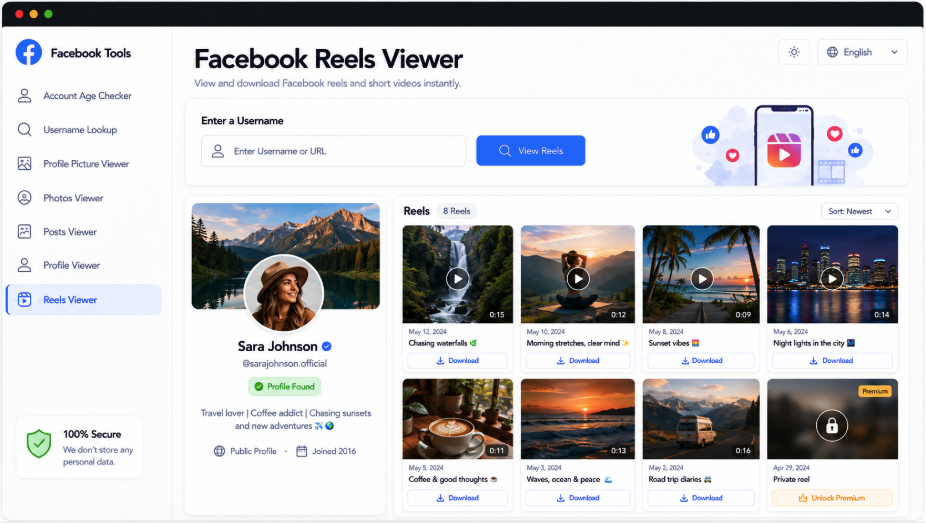
Find a Facebook account by its handle or public URL and explore the reels it makes accessible. AccountPeek places an identity card first, with available profile and cover photos, name, username, intro, and supporting details. Detected reels follow in a scrollable list with previews, publishing information, original links, and downloads where the source supports them.
From the Right Profile to Its Reel Collection
Before watching, check who the videos belong to. The viewer pairs an account summary with its accessible reels, then presents thumbnails, captions, posting details, and media availability beside playback or download controls when provided.
Check the Video Creator’s Identity
Reel Thumbnails and Posting Context
Browse Detected Clips in Order
Save Supported Reel Files
Identify the Creator
Profile Photo, Name, and Intro
Scroll Through Reels
Clips with Publication Details
Open Available Media
Watch or Save a Supported Video
Follow the Account Beyond Its Reels
Reels are one part of a Facebook presence. Use the linked AccountPeek tools to inspect the full profile, examine its avatar or cover, read available posts, or browse photo collections. Each offers a more focused view of the account you are researching.
Inspect the Full Facebook Profile
Bring together accessible account details, profile imagery, intro text, posts, photos, and reels for a broader assessment.
Inspect Full ProfileExamine the Facebook Avatar
Check the account’s display photo in the available larger versions and save a supported image file.
Examine Display PhotoOpen the Facebook Banner
Inspect the cover image associated with the profile and download an accessible version at the quality provided.
Open Profile BannerRead the Account’s Facebook Posts
Follow a chronological selection of available posts with text, dates, image or video previews, and supported downloads.
Read Public PostsBrowse the Facebook Image Collection
Move through accessible photos, enlarge individual images, and save available files from supported collections.
Explore Photo GalleryKeep Each Reel Connected to Its Creator
An account card anchors the results before the videos appear. It may contain the current avatar, banner, full name, handle, intro, profile link, and other visible details. Checking this information helps you avoid reviewing a similarly named person’s reels as you scroll through the feed below.
Searches linking accounts to their reels
Clips detected for the chosen profile
Expanded viewing of accessible videos
Premium Options for Reel Research
Additional Free Searches
100%
A Wider Selection of Reels and Videos
94%
More Context About the Creator
85%
What You Can Examine in Reel Results
Reviewing a reel is easier when you can see both its source and its context. The results page keeps the matching account above the detected videos, while each available entry can provide a preview, publication details, an original link, and supported saving controls. This arrangement helps you explore public clips without digging through separate areas of a Facebook feed.
A Scrollable Video Collection
Detected reels appear together so you can move between clips without starting a separate account search.
Preview Before Opening the Source
Available previews offer a first look at a clip before you follow its original Facebook link.
Posting Details Beside the Clip
Where supplied, publication information helps place each reel in the account’s content timeline.
Saving When the Source Allows It
Accessible video sources may expose a download option for the particular reel shown in the results.
Finding and Reviewing Facebook Reels
The submitted handle or profile URL identifies the account to search. AccountPeek prepares an available identity summary, looks for public reels associated with it, and arranges detected clips below that summary. Preview, date, source, and download information appear only where the returned media supports them.
Supply the Account: Type its Facebook username or paste the public profile address into the lookup field.
Check the Match: Use the returned name, avatar, and profile details to verify whose reels you are reviewing.
Review the Clips: Scroll through detected videos and inspect the previews, publication context, source links, and available save controls.
Frequently Asked Questions
Provide the account's username or public profile address, then start the search. Check the identity card before moving into the reel list. Any detected public clips will appear with the information available for them, which can include previews, posting details, source links, or download controls.
The viewer can return only publicly accessible reels it successfully detects. An account's privacy settings, removed videos, and Facebook's access conditions all influence the collection. Some profiles therefore produce more clips than others, and private, deleted, restricted, or unavailable material should not be expected in the list.
Normally, submitting a public handle or profile URL does not require signing into Facebook. The search relies on information accessible at that moment. Platform changes, privacy restrictions, connection issues, and missing content can prevent a reel from supplying a preview or download even when the profile itself is found.