
Explore Photos from a Public Facebook Profile
How It Works
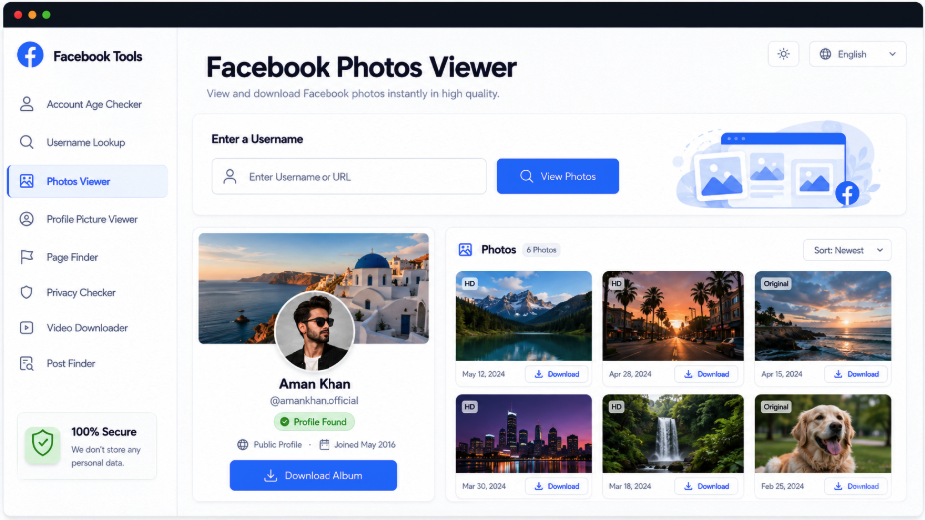
A Facebook username or profile link can lead to a gallery of the images available for that account. AccountPeek first shows identifying details, such as its avatar, banner, name, handle, and intro. After confirming the match, open detected photos at a larger size or save a file when public download access is available.
Review an Account’s Images Without Losing Context
The account summary stays connected to the photo collection, making it easier to tell whose pictures you are viewing. Available results may include enlarged previews, source-post details, dates, position within a gallery, and download controls alongside the detected images.
Verify Who the Photos Belong To
Inspect Enlarged Image Versions
Review the Public Image Collection
Save Accessible Photo Files
Recognize the Account
Avatar, Banner, and Profile Identity
Explore the Collection
Individual Photos and Grouped Images
Open an Image
Enlarge It or Save a File
Other Ways to Explore This Facebook Account
A photograph may raise questions about the post or profile around it. AccountPeek’s other viewers cover account information, avatars, banners, posts, reels, and timelines, letting you move from an image collection to the type of detail your research needs next.
Review the Complete Facebook Account
See available identity information, intro text, profile images, posts, reels, and photos together for wider context.
Review Account DetailsInspect the Account’s Display Picture
Confirm the profile before opening a larger avatar image or downloading its accessible file.
Inspect the AvatarExamine the Cover Image
Look across the full banner, verify the profile it belongs to, and save the public version offered.
See the Full CoverExplore the Posts Behind the Profile
Read available captions and dates alongside photos, videos, previews, and supported download controls in the post feed.
Explore Recent PostsSwitch to Facebook Reels
Find public clips with an account identity check, available playback previews, publication details, and original links.
Watch Public ReelsInspect the Photo Before Saving It
An enlarged preview lets you assess a supported image while retaining its original proportions. Where available, dimensions, detected quality, source-post information, and position within a multi-photo post provide additional context. Use these details to choose the image and version you actually need.
Searches for accounts and their photos
Image quality and position in the collection
A closer view of individual pictures
Premium Access for Facebook Photo Searches
Unlimited Image Lookups
100%
More Available Photo Results
95%
Quicker Review of Multiple Images
90%
Photo Gallery Capabilities
Rather than presenting disconnected pictures, the viewer associates detected photos with the public account returned by your search. Its identity details help establish the match, and the gallery provides a place to review images individually. Larger previews and available downloads make inspection more convenient while keeping the collection tied to its source profile.
Images Arranged for Review
Accessible photos are gathered into a browsable collection instead of scattered across separate search results.
A Bigger View of Each Photo
Enlarge a supported picture to examine its details before deciding whether to download it.
Account Context Before the Gallery
The returned profile information gives you a chance to confirm the account before examining its images.
Save an Available Public File
A download control appears when the detected source provides an accessible image that can be saved.
How a Profile Becomes a Photo Gallery
AccountPeek uses the supplied Facebook handle or URL to locate a public account. It presents the available name, avatar, banner, intro, and other identity details, then looks for accessible photographs connected with that profile. Detected files are arranged for browsing, with larger previews and saving options supplied where supported.
Identify the Source: Submit the account’s username or public Facebook profile link.
Verify the Account: Check the visible identity details returned for that search before reviewing the media.
Examine the Collection: Open detected pictures, inspect larger previews, and save public files when a download is offered.
Frequently Asked Questions
Search with the Facebook username or public profile URL and confirm the returned account information. The gallery will contain the accessible pictures detected during that lookup. Select an image for a larger preview, or use its download control if the source makes a file available.
Only photos accessible from the chosen profile and available to the tool can be returned. The selection may include profile-related pictures and other public images. Privacy restrictions, deleted material, and Facebook's current access conditions can leave a gallery with many images, just a few, or none.
It combines a Facebook account check with a gallery of detected public pictures. You supply the profile, verify its identifying details, and inspect the images returned. Enlarged previews and downloads are available where supported; the tool does not promise access to every photograph associated with an account.