
Explore an Instagram Account’s Public Profile
How It Works
Enter an Instagram handle or full profile address to examine its available identity details and media. The account summary can include an avatar, display name, bio, follower information, and other supported public data. Posts open first, with Reels in a separate tab; select an individual item to inspect its media, read the information returned, and use any saving option provided.
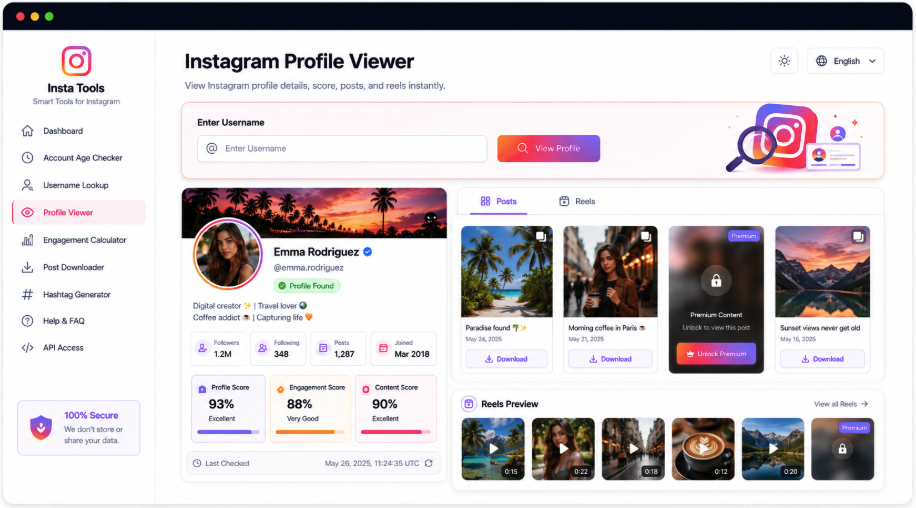
Put the Account and Its Content Side by Side
A public profile is more useful when its details stay connected to what it publishes. AccountPeek places a matching identity card above the available content, then divides Posts and Reels into their own tabs so you can choose what to review.
Identify the Instagram Account
Images, Videos, and Carousels
Choose Between Posts and Reels
Save Media Where Available
Read the Profile
Avatar, Biography, and Audience
Choose a Content Section
Feed Posts or Short Videos
Inspect an Item
View Its Details and Save
Look More Closely at a Profile Section
Different questions call for different views. AccountPeek offers separate Instagram tools for the avatar, current stories, saved highlights, and reels, each accepting the same kind of username or profile address while concentrating on a particular part of the account.
Enlarge the Instagram Profile Photo
Match the avatar to its account, inspect the available larger image, and save the public profile picture when offered.
Enlarge the AvatarSee Available Instagram Stories
Find current public story media, verify the account, and inspect photos or videos with the supported download controls.
Check Current StoriesExplore Saved Instagram Highlights
Select public highlight collections and look through the supported photos and videos preserved within them.
Browse Saved HighlightsWatch the Profile’s Instagram Reels
Review the source account, preview its accessible short videos, inspect reel details, and save supported files.
Explore Reel VideosSeparate Content Types, Keep the Profile Context
Feed posts, carousels, videos, and reels can make a mixed collection difficult to navigate. This layout keeps the account summary above the results and gives Posts and Reels distinct tabs. You can change the media view while retaining the identity details needed to understand its source.
Check who the account represents
Choose a dedicated post or reel view
Inspect accessible media before saving
Premium Options for Instagram Profile Review
Unlimited Public Profile Searches
100%
Additional Feed Content Results
95%
Reverse Data and Multi-Post Exploration
90%
Inside the Instagram Profile Results
AccountPeek starts by matching your search to an Instagram account, then presents the public information its source can retrieve. Identity details, biography, follower figures, and profile imagery provide context above the content tabs. Open an individual post to inspect its available media and information, or switch to Reels for short videos. Supported save controls remain attached to the relevant item.
Account Information in Context
Examine the public avatar, handle, bio, audience figures, and other details returned for the selected Instagram user.
Separate Routes Through Media
Dedicated Posts and Reels tabs let you choose a content type without working through a mixed feed.
Focus on a Single Post
Select an accessible item to review its images or videos together with captions and supporting details.
Save From the Selected Item
When a post supplies a supported download, its save control lets you keep the accessible media on your device.
Turning an Instagram Search into a Profile View
The viewer matches the supplied username or full URL to a public account and requests the information available from its supported source. It builds a profile summary, groups accessible media into Posts and Reels, and normally opens Posts first. From there, individual items provide a closer look, their available details, and any saving controls the source supports.
Find the User: Supply an Instagram handle or the complete address of the profile you want to examine.
Review the Account: Read the returned public details, then choose Posts or Reels to explore the relevant content.
Inspect the Media: Open an item for its available information and use the saving control if one is supplied.
Frequently Asked Questions
Accessible content is divided into Posts and Reels tabs, with Posts usually open initially. Selecting an item reveals the supported media and related information. The collection varies by account because deleted, private, restricted, or otherwise unavailable content cannot necessarily be retrieved.
Open the matching account, choose the Posts or Reels section, and select the item you need. If a supported file is accessible, a save option will be provided with that item. Whether it appears depends on the particular media and the data access available during the search.
A private account may still reveal a small amount of public identity information, but restricted posts, stories, and reels generally remain inaccessible. This viewer cannot replace approved follower access or bypass privacy settings. The details it returns depend on what Instagram currently makes public and what the tool can retrieve.