
Enlarge an Instagram Account’s Display Picture
How It Works
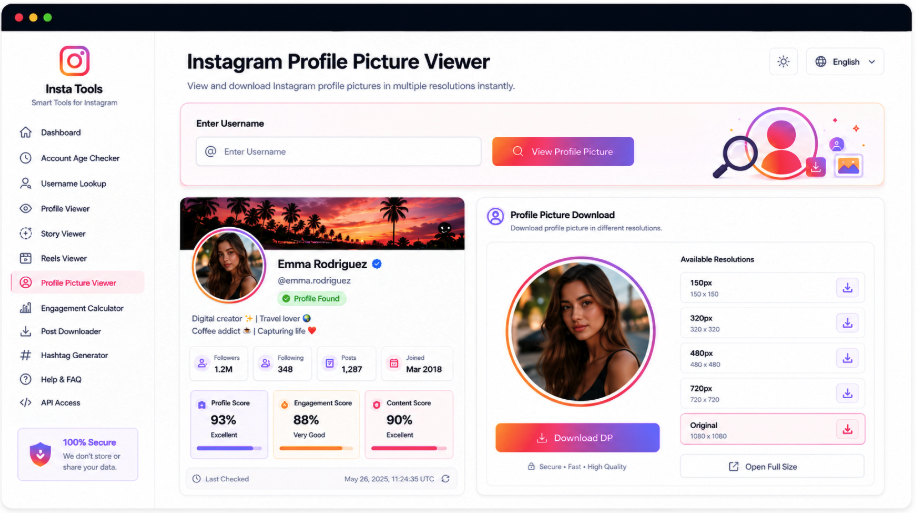
Look up a public Instagram account by handle or complete URL to inspect its available profile photo. AccountPeek returns the name, username, biography, follower information, and other identity details before presenting the DP separately. The larger preview can include the source image’s resolution and dimensions, with a dedicated download control when saving is supported.
Give the Instagram Avatar a Closer Look
A small avatar can be difficult to examine on a busy profile. This viewer opens the available picture apart from other media while retaining the matching name, handle, bio, profile status, and supporting account details above it. Check that context before saving the image.
Account Details for Image Verification
Resolution of the Retrieved File
An Enlarged View of the Avatar
Save the Available Display Picture
Identify the Image’s Owner
Display Name, Handle, and Bio
Inspect the Source Image
Its Preview and Available Resolution
Save the DP File
Open the Image and Download
Move from the Avatar to Other Account Details
A profile picture provides only one piece of an Instagram account’s public presence. Related AccountPeek tools cover full profile information, current stories, saved highlights, and reels. Use the same username or full address to choose the next part of the account you want to investigate.
Examine the Full Instagram Presence
Review supported identity details, biography, posts, reels, profile imagery, and other accessible media in the account overview.
Read Account InformationLook for Current Instagram Story Media
Verify the profile and browse detected story photos or videos, with individual saving options where available.
See Current Story MediaExplore Its Highlight Albums
Inspect public collections of saved stories and the photos or videos associated with each highlight on the account.
Explore Highlight AlbumsOpen the Account’s Reel Collection
Check the creator, play supported reel previews, read the available details, and save accessible short-video files.
Browse the Reel CollectionKeep the Avatar Attached to Its Identity
A standalone picture can be easy to misattribute. AccountPeek places the dedicated image viewer in the same result as the matching profile card, so you can compare the DP with the name, handle, and account details it represents.
Verify whose Instagram image was returned
Check the picture’s dimensions and resolution
Download the selected profile image separately
Premium Options for Instagram Avatar Research
Unlimited Instagram Avatar Lookups
100%
Broader Available Profile-Image Results
95%
Quicker Access to Display Pictures
90%
What the Profile-Photo View Includes
The image result is designed for examining an avatar rather than scrolling through an account’s posts. A handle or full profile URL retrieves the matching identity information, followed by a separate larger picture preview. Available dimensions and resolution help you understand the file’s actual quality, while a dedicated save option appears when a downloadable image is supported.
A Separate Larger Image View
Inspect the retrieved Instagram display picture outside the compact avatar area of the usual profile layout.
Identity Details Beside the Picture
Review the public name, handle, bio, audience information, and related details to verify the image’s account.
Information About the Actual File
Available dimensions and resolution indicate the quality of the returned picture before you decide to save it.
A Dedicated Image Save Control
Download the accessible display-photo file directly using the control supplied with the picture.
From an Instagram Handle to Its Profile Image
The tool identifies the account linked to your input and presents its available public details. It then takes the display picture provided by that profile data and opens it in a separate enlarged view. Supported image information, including dimensions and resolution, appears with the preview, and an available download control lets you save that source image.
Provide the Account: Search with the Instagram username or the complete link to its profile.
Verify the Image Source: Compare the returned handle, picture, and public details with the account you intended.
Inspect and Save the DP: Review the enlarged preview, then use its download control if available.
Frequently Asked Questions
No fixed level of clarity is guaranteed. The viewer displays the image version available from the profile and supported source, so size and resolution can differ between accounts. Where supplied, dimensions and resolution describe the actual returned file rather than promising a sharper version than the source provides.
Generally, the lookup accepts the username or complete profile link without requiring you to browse the account in the app. It relies on public information, however, and access can change with Instagram's rules or the account's settings. An inaccessible profile or image may therefore produce no picture result.
Sometimes basic profile elements, including the display image, remain public even when an account's posts are private. The viewer may show that image if its supported source can access it. This does not expose private stories, messages, posts, or other protected content, and the result can change with the account's settings or platform rules.