
Browse an Instagram Account’s Saved Highlights
How It Works
Highlights collect stories that an account has chosen to keep. Search with a username or complete profile URL to find the matching public account, inspect its identity details, and open the available collections. Posts, Reels, and Highlights have separate tabs, with Highlights selected automatically; each supported photo or video may offer its own saving control.
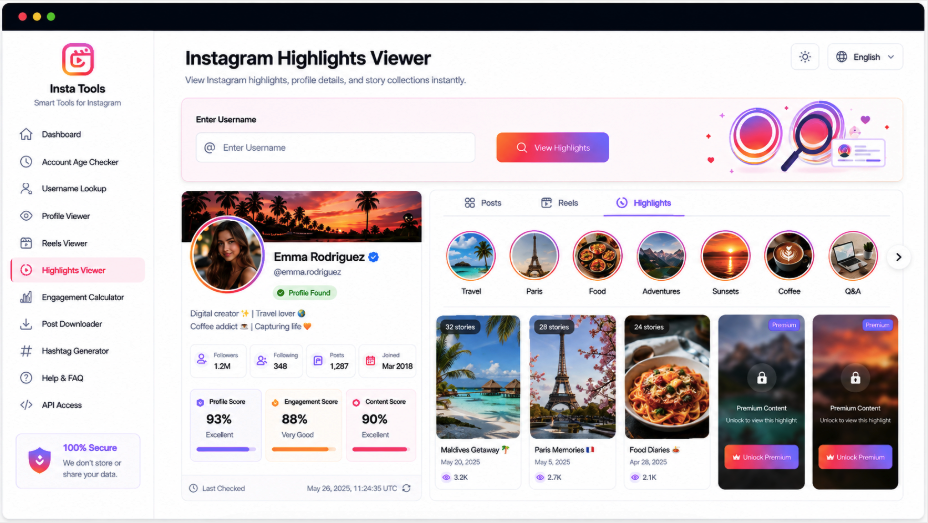
Find the Stories Saved on a Public Profile
AccountPeek gathers accessible highlight collections beneath the account they belong to. Its profile picture, name, bio, and other available information remain visible while separate Posts, Reels, and Highlights tabs keep each kind of media easy to find.
Identity Details Above the Collections
A Preview of Saved Story Media
Distinct Tabs for Each Content Type
Save Supported Highlight Items
Confirm the Collection’s Owner
Avatar, Display Name, and Biography
Choose a Saved Collection
Highlight Covers and Story Media
Navigate Its Contents
Open Items and Save Available Files
Continue Beyond Saved Stories
After examining a highlight collection, you may want to see current stories, recent reels, the account’s full public profile, or its avatar. These dedicated AccountPeek viewers offer those perspectives using the same handle or full profile URL, helping you follow the information relevant to your research.
Open a Broader Instagram Profile View
Review the biography, account details, profile image, posts, reels, and other supported public media in one result.
Review Instagram ProfileTake a Closer Look at the Avatar
Verify the account and inspect a larger version of its public profile picture, with saving available when the source allows it.
Inspect Profile ImageCheck the Account’s Current Stories
Preview accessible story photos and videos after identifying the profile, and save individual items when supported.
Look for StoriesBrowse Its Short Instagram Videos
Match reels to their creator, play available previews, inspect the returned details, and save accessible videos separately.
Watch Available ReelsPreserve the Organization of Saved Stories
Highlights allow selected stories to stay on a profile beyond their usual temporary display period. An account may arrange them around topics, events, or moments. AccountPeek retains that collection-based organization under the matching profile rather than mixing saved stories into Posts or Reels.
Establish the owner before opening highlights
Move through a collection’s photos and clips
Save individual supported highlight items
Premium Tools for Highlight Exploration
Unlimited Highlight Searches
100%
Broader Saved-Story Collections
95%
Quicker Navigation Through Highlights
90%
Working with Highlight Collections
The viewer gives saved stories a dedicated place in the account results. A username or URL search first returns available identity information, then separates supported media into Posts, Reels, and Highlights. Within Highlights, select a collection to inspect its photographs or videos, move between items, and use saving controls where available.
Open a Saved Story Collection
Select a detected highlight album to inspect the accessible photographs and videos it contains.
Keep Highlights Apart from Other Media
Separate tabs distinguish saved collections from feed posts and reels during account research.
Move Between Photos and Clips
Built-in navigation lets you review successive supported items without leaving the selected highlight collection.
Save a Highlight Item
A supported photo or video may include its own saving option for keeping that accessible item.
From Account Search to Highlight Browsing
The search locates the Instagram account associated with your input and retrieves its available public information. Supported content is divided into tabs, with Highlights opening automatically when collections are present. Choose a collection, move through its media using the controls, and look for a save option on items with an accessible downloadable source.
Locate the Account: Enter the Instagram username or paste its full profile address into the search box.
Choose a Collection: In Highlights, open the available album containing the story media you want to inspect.
Review Its Items: Navigate between photos and videos, saving supported files with the controls provided.
Frequently Asked Questions
Available collections are grouped under the account returned by your search. Choose Highlights, select a collection, and move through its photos and videos with the navigation controls. You still choose the collection you want, but do not need to keep returning to unrelated profile sections to explore the detected highlights.
Restricted collections generally cannot be shown through this public viewer. Some identity details may remain visible, but private stories or highlights should not be expected in the results. Availability depends on the account's privacy settings, Instagram's rules, and what the supported source can access.
A collection may have been removed from the account, restricted, made private, or become unavailable to the data source. Connection problems and platform changes can also interrupt loading. Verify the handle and check that the highlight remains publicly visible; when only particular collections are missing, a later search may return different results.