
Watch Reels from a Public Instagram Account
How It Works
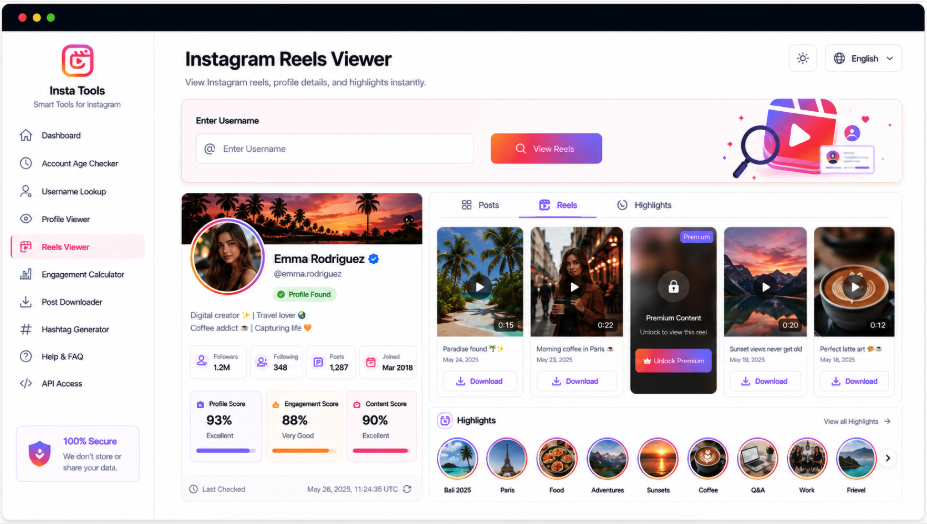
A handle or complete Instagram profile URL is enough to start a reel lookup. First, verify the returned account through its avatar, name, bio, follower details, and other public information. Posts, Photos, and Reels appear in separate tabs, with Reels open first. Supported videos can be selected for larger playback and saved when a video file is accessible.
Give Short Videos Their Own Viewing Space
The reel section puts detected short-form videos within reach while retaining the creator’s profile details. Thumbnails, playback controls, and available save options sit in the Reels tab; Posts and Photos remain separate, so changing content types does not require another account lookup.
Public Details About the Creator
Preview and Play Accessible Reels
Navigate Posts, Photos, or Reels
Save Each Supported Video Separately
Check the Reel’s Creator
Avatar, Name, and Public Bio
Select the Media Type
Feed Content, Images, or Short Clips
Open a Reel
Play the Video or Save Its File
Explore Other Parts of the Instagram Account
A short video may be only the beginning of your research. AccountPeek also provides focused views for stories, saved highlights, the profile picture, and wider account information. Search by handle or profile address in the viewer suited to the content you want to examine.
See the Creator’s Complete Public Profile
Bring accessible account details, biography, avatar, posts, photos, and reels together for a more comprehensive view.
Explore Account OverviewInspect the Creator’s Profile Image
Identify the account, enlarge its available avatar, and save the public image file where supported.
Open the Display PictureView Public Story Updates
Open the account’s accessible story photos or videos and use the separate saving options attached to supported items.
Browse Current UpdatesReview Collections of Saved Stories
Browse detected highlights by collection and inspect the public photos and videos kept on the profile.
Inspect Saved CollectionsKeep Reel Playback Separate from the Feed
Finding a particular format is harder when every result shares one long list. The viewer places Posts, Photos, and Reels in distinct sections beneath the matching account summary. Reels therefore remain focused on short videos, their supported playback, previews, and saving controls while identity information stays close at hand.
Confirm the creator behind the videos
Choose the appropriate media tab
Play accessible clips and save supported files
Premium Access for Instagram Reel Browsing
Unlimited Searches for Instagram Reels
100%
More Retrievable Short-Video Results
95%
Faster Saving Across Multiple Reels
90%
What the Reel View Provides
The results combine creator verification with a dedicated short-video area. After matching the handle or URL, AccountPeek shows available profile information and separates supported Posts, Photos, and Reels. Select a reel to open a larger player, inspect the details supplied, and use its save option if an accessible downloadable file is returned.
Short Videos in a Dedicated Section
Reels have their own tab, keeping them separate from still images and ordinary feed posts.
Expanded Playback for Selected Clips
A supported reel can open in a larger player for closer viewing and easier playback.
Context About the Source Account
Review the creator’s handle, avatar, bio, follower information, and other public details before watching.
Save an Accessible Reel File
Download controls are supplied when the retrieved source offers a supported video file.
How the Reel Search Is Assembled
Your Instagram handle or full profile link is used to identify the public account. Available identity details appear first so you can check the match. The tool then groups supported media into Posts, Photos, and Reels, selecting Reels for convenient access. Individual clips can offer enlarged playback, additional information, and a save control when their source file is available.
Specify the Creator: Enter the account’s Instagram username or complete profile URL.
Find the Clips: Use the selected Reels section to browse the short videos returned for that account.
Watch or Download: Open a supported reel, play it in the viewer, and save it if a download control appears.
Frequently Asked Questions
Yes, when the video source is accessible and supported, selecting a reel opens it for playback in the larger viewer. Begin by finding the public account and checking its identity, then browse the Reels tab. The collection is limited to videos the source can retrieve at the time of your search.
No. Public identity details may sometimes be visible, but videos restricted by a private account are generally unavailable. Viewing protected reels normally requires legitimate access through Instagram under the owner's privacy settings. The tool cannot bypass that restriction, and its results depend on current public access.
Deleted or archived videos, private settings, regional restrictions, and unavailable files can all affect the collection. Platform changes or temporary loading problems may also interfere. Check the username or URL first; an account can load successfully even when an individual reel cannot currently be retrieved.