
Find Current Stories on Public Instagram Profiles
How It Works
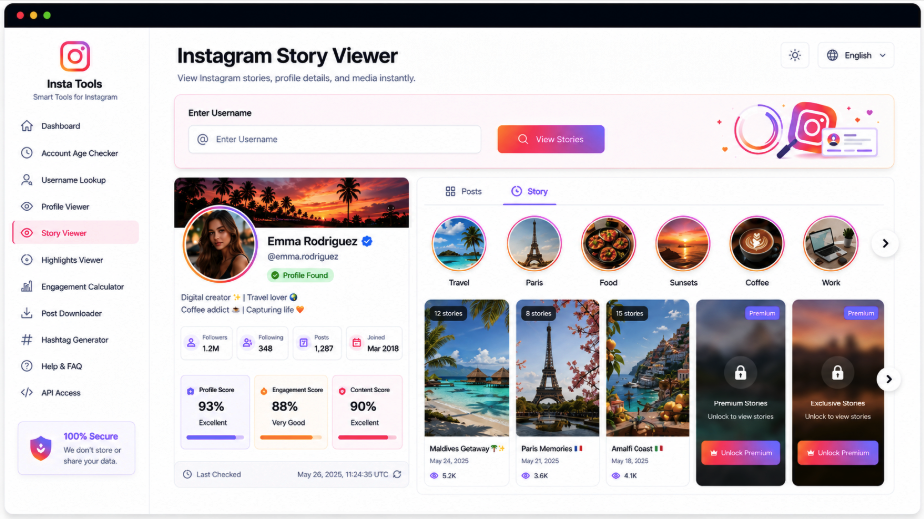
Check the stories currently accessible from an Instagram account using its username or complete profile link. Before loading story media, AccountPeek shows available identity information, including the avatar, displayed name, handle, biography, and follower details, so you can recognize the account you requested.
Locate the Account, Then Explore Its Stories
The results connect a public profile with the story photos and videos detected for it. Verify the account in the profile section before opening media, then move through the available items in the sequence returned by the source.
Identify the Story’s Source Profile
Preview Stories One at a Time
Browse Accessible Story Photos and Clips
Save Controls Attached to Each Story
Recognize the Profile
Avatar, Handle, and Biography
Explore Current Stories
Still Images and Video Updates
Save Supported Items
Inspect the Media Before Downloading
Find More Than Temporary Updates
Stories offer a current snapshot, while other parts of a profile provide different context. Move to saved highlights, reels, a wider account overview, or a separate avatar view using AccountPeek’s related Instagram tools. Each starts with a username or full profile address and focuses on the chosen content type.
Review the Wider Instagram Account
Combine available identity details, bio, feed posts, reels, profile imagery, and supporting public information in a single view.
Examine Public ProfileOpen the Instagram Avatar Separately
Confirm whose image you are viewing, inspect the available larger version, and save a public profile-photo file when offered.
Preview the AvatarBrowse Stories Kept as Highlights
Explore saved collections, view their accessible photos and videos, and follow the account’s highlight organization.
Open Saved HighlightsWatch Available Instagram Reel Videos
Identify the source profile before playing supported clips, checking their posting information, or using a save control.
Review Short VideosFollow the Available Story Sequence
Each detected story receives its own media entry, making photos and videos easier to inspect separately. An entry may show a preview, file type, position in the sequence, originating username, posting details, and whether the source is currently accessible.
An Expanded View of the Story
The Resolution Supplied by the Source
Story Media Linked to Its Account
Premium Access for Story Lookups
Unlimited Searches for Public Stories
100%
Additional Accessible Story Results
95%
Quicker Movement Through Story Media
90%
What the Story Viewer Covers
This view concentrates on the photos and videos currently available as public Instagram stories. After a username or full URL search, the identity summary helps establish the source account before supported media loads. Its avatar, name, bio, audience information, and other visible details provide context while you browse the detected updates.
View Without Your Personal Instagram Profile
Inspect available public stories through the tool instead of opening them from your own Instagram account.
Establish the Account’s Identity
Compare the returned avatar, handle, biography, and follower details before proceeding to the story items.
Both Story Images and Video Clips
A shared viewing area accommodates accessible photo and video updates with straightforward navigation between them.
Focus on Stories Available Now
The search checks for current public story media and displays supported items that can be retrieved.
How Current Story Media Is Located
The supplied username or complete URL is matched to an Instagram profile. Available account information loads first, giving you an opportunity to verify the name, avatar, handle, bio, and follower details. The tool then checks for current public stories and presents successfully retrieved photos or videos in the story area.
Specify the Profile: Enter the Instagram handle or paste the complete public account address.
Check Its Identity: Confirm that the returned profile information matches the person or account you intended.
Explore Current Updates: Review the public story photos and clips the lookup successfully retrieves.
Frequently Asked Questions
No. Stories protected by a private account's follower settings generally remain inaccessible to this tool. A few basic identity details may still be public, but that does not grant access to restricted photos or videos. Appropriate access through Instagram is required for content protected by the owner's settings.
The account may have no active stories, or its updates may have expired, been removed, or become restricted. A private profile, temporary access issue, or unsupported source can also leave the story area empty. Confirm the account address first; a correctly loaded profile does not necessarily have a publicly retrievable story at that moment.
The lookup normally starts with only a username or full profile URL and retrieves supported public information without opening the story from your personal profile. Its ability to display media still depends on the account's privacy configuration and Instagram's current access conditions.