
Estimate How Long an Instagram Account Has Existed
[ig_age_ym]
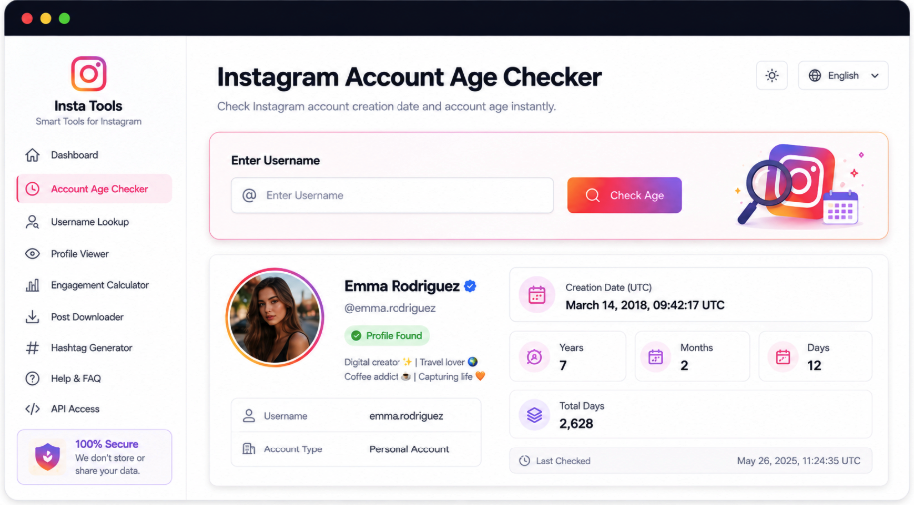
Supply an Instagram username or full profile address to review the account’s available creation information. The result pairs identifying details with a starting month and year in MM/YYYY format when supported data is present. It also expresses elapsed age in years and months and provides an approximate total day count.
Check the Available Starting Month and Year
A year alone can leave an account’s age unclear. AccountPeek locates the matching Instagram profile and, where supported, shows its creation period as MM/YYYY, then converts that period into an age expressed in years and months.
Identify the Instagram Profile
Elapsed Years and Months
Starting Period Shown as MM/YYYY
Approximate Days Since the Start
Verify the Account First
Avatar, Display Name, and Handle
Review the Start Period
Available Creation Month and Year
Read the Calculated Age
Elapsed Time and Estimated Day Count
Add Context to an Instagram Age Check
An account’s age is only one part of its history. AccountPeek’s other Instagram viewers let you inspect the profile, avatar, reels, stories, and highlights using a username or complete link, with each tool concentrating on the public details or media relevant to that view.
Research the Account Beyond Its Age
Combine available profile details, bio, avatar, posts, reels, and other public media in a broader account overview.
Open Account OverviewExamine the Profile Image and Its Quality
Match the avatar to the account, check the available resolution, and save a supported display-picture file.
Examine Avatar QualityReview Saved Stories for More Context
Identify the profile, explore its available highlights, preview collection media, and save accessible supported items.
Review Saved Story Media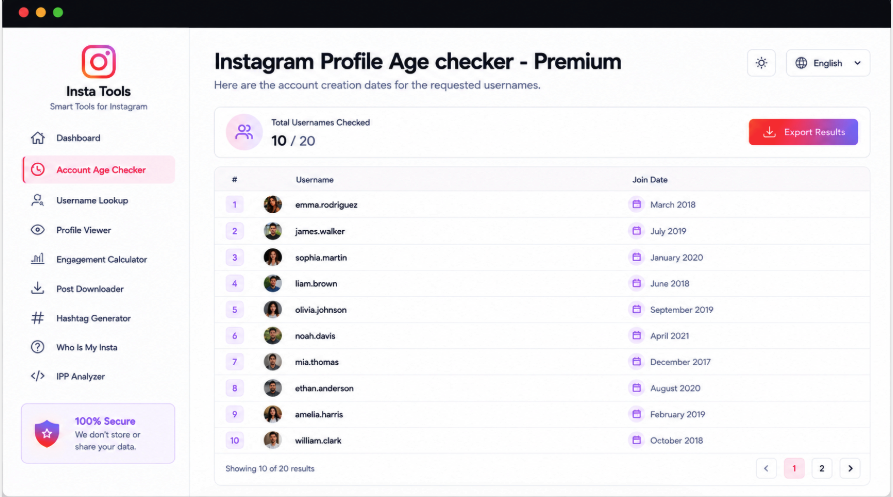
Compare Account Ages with Premium Bulk Search
Premium users can submit up to 20 Instagram handles in one request. The bulk results pair each detected account with its estimated starting month and year, making it easier to compare several profiles without repeating the single-account process for every username.
Submit as Many as 20 Handles
Compare Ages in a Grouped Result
MM/YYYY Start Period for Each Account
Export the Returned Findings
Understand What the Age Figures Represent
Two accounts created in the same year may still differ by many months. Where available, the starting month and year provide more detail than the year alone. AccountPeek shows that period as MM/YYYY, converts it into years and months, and estimates total days while keeping the matching identity card alongside it. Missing source information is not replaced with an invented month, exact date, or unsupported age.
Match the age result to the correct profile
Read the supported month-and-year starting point
Compare elapsed months, years, and estimated days
Premium Access for Account-Timeline Research
Unlimited Instagram Age Searches
100%
Additional Available Creation Details
95%
Multiple Profiles in One Check
90%
What an Account-Age Result Tells You
The checker organizes supported creation information so you do not have to infer account history from old posts alone. After a username or URL search, available profile details help identify the account. If a starting month and year can be found, the result presents that period together with elapsed years, months, and an estimated day count.
Available Joining Period
Look for a supported starting month and year associated with the public Instagram account.
Identity Alongside the Timeline
The returned avatar, name, handle, and follower information help establish which account the age belongs to.
Elapsed-Time Conversion
Supported creation data is translated into years and months, with a separate approximate total of days.
Search by Handle or Full Address
Start the check with either the Instagram username or its complete profile link.
How the Creation Period Becomes an Age Result
AccountPeek matches your input to an Instagram profile and requests the supported public details, including any available creation-period data. When a starting month and year are returned, it calculates elapsed years and months and estimates a total day count. Those figures remain attached to the profile card for review alongside the account’s identity information.
Supply the Handle or Link: Enter the Instagram username or complete profile address in the checker.
Request the Timeline: Start the search to identify the account and retrieve its supported public details.
Interpret the Figures: Examine the available start period, calculated years and months, approximate days, and matching identity information.
Frequently Asked Questions
An exact day is not always available. The supported result is usually a creation month and year, from which the tool calculates years and months and estimates total days. Instagram does not expose complete creation details for every profile, so the precision and availability of a result vary by account.
It is only as precise as the creation information returned by the source. A known month and year support an elapsed-time calculation, but an unknown starting day makes the total day count approximate. Use the available period to understand account history rather than interpreting every displayed figure as an exact registration timestamp.